
ESPGeiger Stations - Public WebAPI
ESPGeiger can optionally contribute its readings to the public map at stations.espgeiger.com, a global radiation-monitoring grid built from community-run Geiger counters. Participation is opt-in, signed end-to-end, and privacy-respecting.
What gets sent
Posts and handshakes use MessagePack (compact binary). The schemas below list the logical fields.
Per-minute post (CPM Readings mode):
| Field | Type | Description |
|---|---|---|
id | uint32 | Station ID (assigned at first handshake) |
n | uint32 | Unix timestamp of the reading (seconds) |
c | float32 | Current CPM |
u | float32 | Microsieverts per hour |
hv | float32 | HV tube reading (ESPGeiger-HW only) |
t | float32 | Temperature in °C (environment sensor only) |
h | float32 | Humidity in % (BME280 / AHT family only) |
p | float32 | Pressure in hPa (BME280 / BMP280 only) |
In Heartbeat mode the radiation fields (c/u/hv) are omitted
- the post becomes a minimal
{id, n}body so the server still sees the station as alive without any readings leaving the device.
Every 15 minutes (health snapshot, piggy-backed on the post above):
| Field | Type | Description |
|---|---|---|
ut | uint32 | Uptime in seconds |
mh | uint32 | Free heap (bytes) |
l | uint32 | Loop iterations per second |
tk | uint32 | Peak ticker duration in the last 60 s (µs) |
rs | int32 | WiFi signal strength (dBm) |
Health fields live only in the raw tier server-side - they age out and are never aggregated into long-term history.
Handshake (once per hour, or on first boot / reset):
| Field | Type | Description |
|---|---|---|
n | uint32 | Unix timestamp of the handshake (seconds) |
pk | string | Device public key, base64 (ECC secp192r1, 64 chars) |
ci | string | Device chip ID (hex). The server looks up or creates a station for this chip and returns the numeric id the device quotes in subsequent posts. |
v | string | Firmware release version - tag/sha when built from a non-tagged commit (e.g. devel/7a2407d), or just tag for released builds (e.g. 0.9.3). |
bd | string | Chip model (e.g. esp8266, ESP32-C3) |
gm | string | PlatformIO build environment name (e.g. espgeigerlog_serial) |
gc | string | Geiger counter model - auto-detected on Serial builds, user-set on Pulse builds |
td | uint32 | Tube detection bitmask: bit 0 = α, bit 1 = β, bit 2 = γ. 0 = unknown / not set on the device. Bits 3-7 reserved. |
fl | uint32 | Feature-flag bitmask (which optional output modules are compiled in) |
rr | uint32 | Normalised last-reset reason |
m | uint8 | Sharing mode: 1 = heartbeat-only, 2 = full readings (mode 0 doesn’t handshake) |
la | float32 | Optional. Latitude in degrees (-90..90), 2-decimal-place rounded on device for privacy (~1.1 km cells). Omitted when both la and lo are 0 (the “use IP” signal). |
lo | float32 | Optional. Longitude in degrees (-180..180). Same rounding and omission rules as la. |
The handshake is what registers your station on the map and keeps the server’s metadata (version, board, mode, etc.) current. The server responds with the assigned station ID, which the device then uses as id in subsequent per-minute posts.
Configuring on the device
The /webapi page on each device shows the ESPGeiger Network controls:
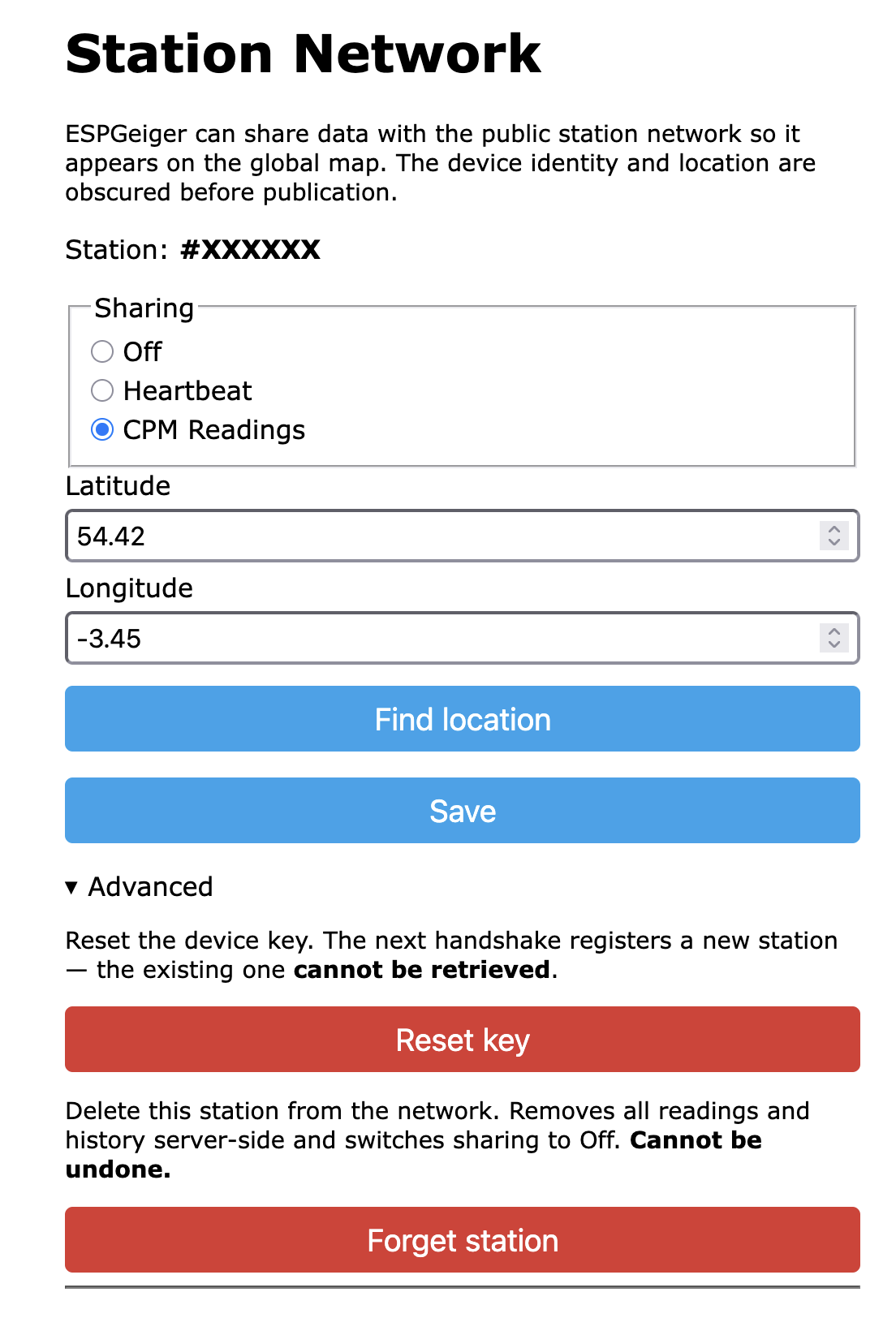
- Station ID - assigned by the server on first handshake. Click to view your station on
stations.espgeiger.com. - Sharing - tri-state: Off / Heartbeat / CPM Readings (see below).
- Latitude / Longitude - optional. Leave both at
0to fall back to coarse IP-based geolocation. Coordinates are rounded to 2 decimal places (~1 km resolution) before publication. - Find location - uses browser geolocation to fill in the lat/lon fields.
- Advanced -
Reset key(rotate identity, register as a new station) andForget station(server-side delete; see below).
Sharing modes
A single tri-state pref (webapi.mode, default 2) controls what leaves the device:
| Mode | Label | Behaviour |
|---|---|---|
2 | CPM Readings (default) | Hourly handshake, per-minute posts with c/u, 15-min health snapshots. Your station appears on the map. |
1 | Heartbeat | Hourly handshake + 15-min health snapshots only. No radiation data leaves the device. Your station appears in fleet-size / uptime stats but not on the map. |
0 | Off | Nothing sent - no handshake, no posts. |
Switching modes is a single click on the device’s /webapi page. The posting cadence changes immediately; the server learns the new mode at the next handshake (within an hour, declared via the handshake’s m field).
Identity and signing
Each device generates an ECC keypair on first run; every post is signed with it. The server pins your public key on first handshake and refuses unsigned or wrong-key posts. No shared secrets, no passwords to leak, and your station can’t be impersonated.
The /webapi page’s Advanced panel exposes two destructive actions:
- Reset key wipes the local private key and reboots. The next handshake registers a fresh station; the old one ages out server-side. Use this to migrate to a new identity while still contributing data.
- Forget station sends a signed delete to
/api/1/forget. The server purges the row, all readings, and all history, then sharing flips to Off. Irreversible - re-enabling later registers as brand new. This is the GDPR right-to-erasure path.
Map presence
Once you’ve submitted a handshake, visit https://stations.espgeiger.com/station/<id> to see your station. Each station also gets a memorable three-word alias - e.g. curie-counts-photons - which you can share directly: https://stations.espgeiger.com/station/curie-counts-photons.
Pin colours
Each station is a teardrop pin on the map. Colour reflects the station’s current reading vs its own baseline, not a global threshold. A tube with high local background (e.g. sitting next to granite) is only flagged when it departs from its own typical rate.
| Colour | State | Meaning |
|---|---|---|
| Blue | New | Fewer than ~4 h of data. Baseline not yet established. |
| Green | Normal | Reading consistent with baseline. |
| Yellow | Elevated | Mild departure above baseline. Often routine variation. |
| Orange | Warning | Larger or longer-lasting departure. Common for weather events (radon washout after rain). |
| Red | Danger | Sustained or large excursion. Hardware fault, point source, or strong environmental event. |
| Dark red | Critical | Severe or prolonged excursion. Operationally significant. |
| Grey | Silent | No post received in the last 15 minutes. Likely lost connectivity, lost power, or device failure. |
The score is a Poisson CUSUM (cumulative sum) detector running against the station’s 7-day baseline, with a per-hour-of-day adjustment so stable daily cycles (heating, occupancy, indoor radon) get absorbed rather than triggering the same alert every day. Routine Poisson noise is absorbed by a slack term; sustained or large excursions accumulate across consecutive 15-minute buckets and open an event when they cross the configured threshold. The accumulator is normalised by each station’s own σ so a 2σ excursion sustained for an hour reads the same on a 10 cpm tube and a 1000 cpm tube - same operational severity, same alert level. The same algorithm handles spikes, persistent drops, and slow drift. Refresh cadence is 10 minutes server-side.
Cluster pins use a weighted vote with geometric weights: Critical weighs 16, Danger 8, Warning 4, Elevated 2, others 1. A single Critical child decisively tints clusters up to ~16 members dark red; a single Warning tints up to ~4 members orange. Larger clusters need the alert state to dominate by weighted total. Silent and New never apply a tint, so dead tubes don’t colour the neighbourhood.
Events timeline
The map and the station detail page both use the same five severity bands. The Events panel on the station page additionally shows direction (↑/↓), duration, and peak departure score:
| Badge | Meaning |
|---|---|
| Elevated | Above noise floor. Often weather-driven (radon washout after rain). |
| Warning | Unambiguous excursion. Worth investigating. |
| Danger | Sustained or large excursion. Hardware fault or genuine source likely. |
| Critical | Severe or long-running excursion. Tube failing, point source nearby, or pulse line shorted. |
Pin colour follows the same band exactly: a station whose event peaks at Danger shows a red pin on the map and a Danger badge on its event row.
Event rows also show direction (↑ above baseline, ↓ below), duration, peak departure σ-score, and an (ongoing) tag if still active. Offline events use a separate grey badge with no severity, because silence isn’t a severity-banded anomaly.
Endpoint
Canonical URL: http://api.espgeiger.com/api/1/. HTTP-only by design - each request is individually signed, so it can’t be tampered with in transit, and adding TLS would cost a lot of memory on the ESP8266 for no real security gain.
| Path | Method | Purpose |
|---|---|---|
/api/1/handshake | POST | Register or refresh station metadata |
/api/1/post | POST | Submit a reading (+ optional health snapshot) |
/api/1/forget | POST | Right-to-erasure - purge station + history |
Opt-out at any time
Set sharing to Off in the device’s /webapi page. Posts stop immediately. Your existing station remains on the map but its “last seen” timestamp stops advancing; it falls off the active list after the server-side staleness window. Use Forget station instead if you want the server to actively delete it.